DOJ Grants Financial Management Training FAQ
LOGIN & ACCESS ISSUES
Q: I'm getting an error message "Your Vendor Grant has expired" when trying to log in. What should I do?
A: This message indicates your award status is closed and your access period to FMT has ended. If you have an active award, please contact the OCFO Support Team at OJP.ITServiceDesk@ojp.usdoj.gov with your name, email, award number, and UEI number to request renewed access.
Q: How do I reset my password? A: Use the "Lost Password" link on the home page and enter your email address. You will shortly receive an email with a link to reset your password. Please check your spam/junk mailbox. If you continue to have issues, contact the service desk for assistance.
Q: I can't log in even though I have the correct username and password. What should I do? A: First, verify your Caps Lock is off and you're entering credentials correctly. Clear your browser cache and cookies, then try again. If problems persist, try a different browser or incognito/private browsing mode. Contact the service desk if you still cannot access your account.
Q: My email address changed. What should I do? A: Email the service desk at OJP.ITServiceDesk@ojp.usdoj.gov to update your account information. Include your old email address, new email address, name, UEI, and award number.
REGISTRATION & ACCOUNT SETUP
Q: How do I register for the online training? A: Visit the Online Grants Financial Management Training site and click "Create new account" link on the homepage.
- If you have an active award: Select the "Grantee" tab, enter your UEI number, and select your grant award number
- If your solicitation application is pending: Select the "Applicant" tab and enter your solicitation number and UEI number
Follow the on-screen instructions and enter all required information.
Q: When I try to create an account, it says my UEI is invalid. What should I do? A:
- Verify you are entering the correct 12-character UEI (not your old DUNS number)
- Ensure you have accepted your award in JustGrants
- Wait 3-5 business days after award acceptance for the system to update
- If the problem persists, contact the service desk with your UEI and award number for verification
Q: My grant award number isn't listed when I try to register. What should I do? A: This usually means your grant hasn't been loaded into the system yet. Verify that:
- You have accepted your award in JustGrants
- At least 3-5 business days have passed since award acceptance
- You are entering the correct UEI associated with the award
If all conditions are met and the award still doesn't appear, contact the support team with your grant award number and UEI.
Q: Can I have multiple accounts if I work with multiple organizations? A: Each user should have only one account. If you work with multiple organizations/UEIs, contact the service desk to link all relevant awards to your single account.
ACCESSING TRAINING
Q: How do I access the training after registration? A: After logging in, navigate to your dashboard where you will see available training modules. Click on "Training I - DOJ Grant Financial Management Training" to begin.
Q: The training modules won't load or I see a blank screen. What should I do? A:
- Ensure your browser is up to date (Chrome, Firefox, Safari, or Edge recommended)
- Disable pop-up blockers for the training site
- Clear your browser cache and cookies
- Disable browser extensions that may interfere with the training
- Check that JavaScript is enabled
- Try accessing the training from a different browser or device
If issues continue, contact the service desk with details about your browser type and version.
CERTIFICATES & COURSE COMPLETION
Q: How do I get my certificate after completing the training? A: After successfully passing all 24 modules, evaluation, and final exam, your certificate should be available for download on your profile:
- Click on your name in the upper right-hand corner of the page
- Select "Profile"
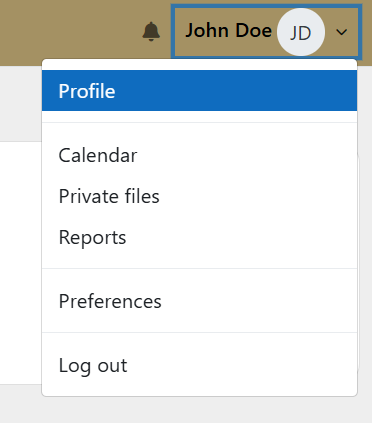
- Click on "My Certificates" link
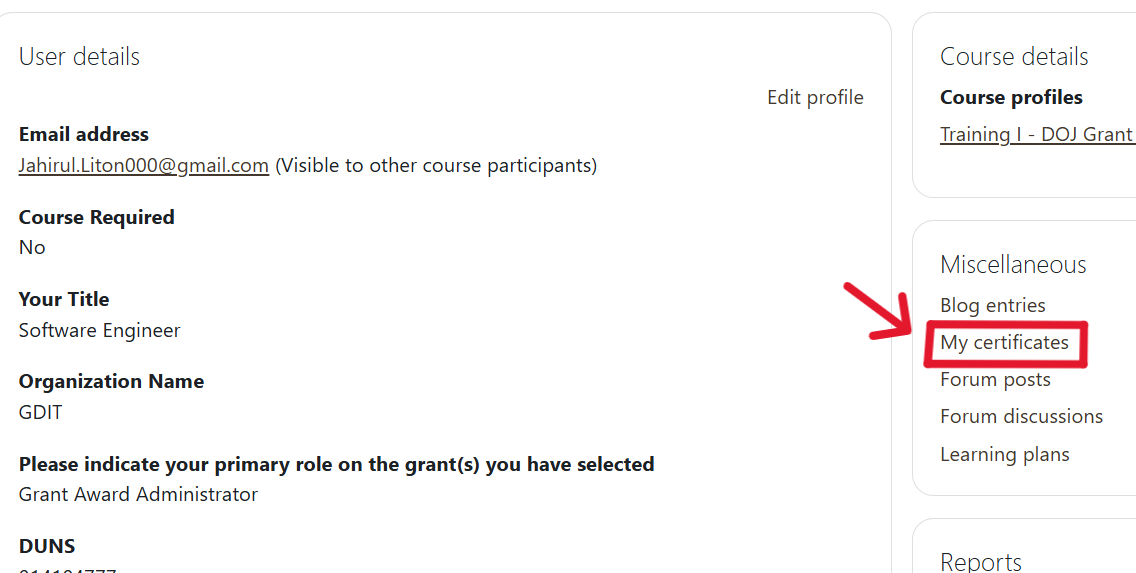
- Download your certificate from this page.
Q: I completed all modules but don't see my certificate. What should I do? A: Verify that you have:
- Completed all 24 training modules
- Completed the course evaluation
- Passed the final exam with a score of 70% or higher
Q: I need to retake the training. How do I reset my course? A: Once you earn your certificate, you are required to recertify every three years by choosing one of the following options:
- Completing the online course
- Attending an in-person seminar
You will receive an automatic email notification 60 days before your certificate expires. At that time, your course will reset and you can log in to your account to begin the course again.
Q: My certificate expired but I didn't receive a notification. How do I recertify? A: Check your spam/junk folder for the notification email sent 60 days before expiration. If your certificate has already expired, contact the service desk to have your course reset so you can recertify.
Q: How do I connect my training to multiple grant awards? A: Contact the support team at OJP.ITServiceDesk@ojp.usdoj.gov with your name, email, UEI, and all relevant grant award numbers to ensure your training completion is associated with all your grants.
Q: Can I print my certificate? A: Yes, once you download your certificate PDF from your profile, you can print it using your computer's print function.
GRANT-SPECIFIC ISSUES
Q: How do I update my organization's UEI in the system? A: Email the support team at OJP.ITServiceDesk@ojp.usdoj.gov with your current account information and the updated UEI information to have this changed in the system.
Q: I have a subaward. How do I register for training? A: Subrecipients must register using the UEI number of the direct OJP award recipient, not your organization's UEI. If you have difficulty registering, contact the support team with your subaward information and your direct awardee’s organization.